


The photobooth business is not just about providing a camera and printer and then waiting for customers to come. Behind the seemingly simple photo results, there are many things to consider, from market research, equipment selection, and location to service and machine maintenance.
A photobooth sells an experience. Therefore, business success is determined not only by print quality, but also by how easy, fast, enjoyable, and consistent the customer experience is. For beginners, understanding what should and should not be done can help reduce mistakes when starting a business.
Do: Conduct Market Research
Before buying equipment, research the market and competitors. Study the types of photobooths already available in your area, service prices, the concepts offered, competitor locations, and even customer reviews. Research helps you understand which opportunities are still open. For example, in one area there may already be many minimalist-themed photobooths, but no one yet offers a vintage, Korean-style, or newspaper concept, or a specialized service for corporate events. GoPoto also advises prospective entrepreneurs to study prices, packages, property styles, photo templates, and competitor reviews before starting a business.
Don’t: Buy Equipment Without Calculations
A common beginner mistake is buying equipment right away because they are attracted to photobooth trends. However, every business has different needs. Before buying a unit, first decide which business model you will run. Do you want to rent a photobooth for events, open a permanent booth in a mall, run a print station, or start from home? After that, calculate the needs for the camera, printer, lighting, computer, monitor, booth frame, backdrop, props, internet connection, transportation, promotion, and maintenance costs. Do not only calculate the purchase capital. Operating costs and a reserve fund also need to be prepared.
Do: Choose a Location That Matches Your Target Market
A good location is not just a busy one. You need to make sure the visitors there match your target customers. Cafés, malls, campuses, tourist destinations, wedding venues, entertainment centers, and community spaces can each have different visitor characteristics. A photobooth with a youth-oriented concept may be better suited to areas frequently visited by students or creative communities. Also consider booth visibility, electricity access, internet connection, security, operating hours, and rent costs. GoPoto emphasizes the importance of researching crowd levels, booth position, target market, and the presence of competitors before choosing a location.
Don’t: Choose a Location Just Because It Is Busy
A high number of visitors does not always mean a high number of transactions. A place can be very busy, but its visitors may not have time or interest in using a photobooth. For example, a transit area may have many people, but most visitors are just rushing to their destination. Conversely, a café with fewer visitors can generate better transactions because customers have time to relax. Observe on both weekdays and weekends. Compare visitor numbers, visit duration, and activities before making a decision.
Do: Prioritize Quality and Compatibility
Cameras, printers, software, lighting, and screens must work as one system. Do not choose equipment based only on the lowest price. Consider photo quality, printer speed, spare parts availability, consumable costs, driver stability, and compatibility with the photobooth software. The printer is one of the most important components because it directly affects the customer experience. GoPoto advises owners to pay attention to spare parts availability, consumables, and printer driver stability with software such as Glava. Glava software is designed to support various printer types, so business owners can choose equipment based on their needs, quality, and budget.
Don’t: Ignore Consumables Costs
A photobooth business needs photo paper, ink, ribbon, electricity, and other supporting equipment. These costs must be included in the service price calculation. Do not set prices just by looking at competitors' prices. Calculate the cost per session or per print in detail so the business keeps a profit margin. Also make sure paper and ink stock is always available. Running out of print media when the booth is busy can disrupt the customer experience and reduce trust in the business.
Do: Test All Equipment Before Use
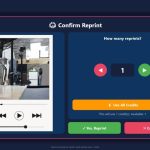
Before the photobooth is used by customers, perform thorough testing. Check the camera, lighting, printer, screen, internet connection, payment system, filters, frames, countdown, QR code, and reprint feature. For events, run a simulation of the day-of conditions. Make sure the booth position, cables, backdrop, props, and customer flow are ready. GoPoto recommends testing all equipment and software before use at the first event to reduce the risk of technical problems.
Do not wait until the printer jams, the camera is not detected, or the connection drops before checking. Create a daily or weekly checklist. Check lens cleanliness, cable condition, storage capacity, paper stock, payment system, and device temperature. For fixed booth businesses, schedule physical inspections regularly. Remote maintenance can help with software and configuration issues, but physical inspections are still necessary.
Do: Make Use of Remote Maintenance
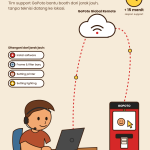
Remote support can help business owners with installation, setting adjustments, troubleshooting, and frame and filter updates from a distance as long as the booth has an internet connection. GoPoto provides maintenance packages that include Glava software updates, troubleshooting assistance, and remote maintenance. The technical team can help with certain settings and repairs without having to come to the location directly. This feature is especially useful for booth owners who have units outside the city or who run booths without a full-time operator.
Don’t: Assume Remote Maintenance Solves Every Problem
Remote maintenance does not replace physical inspection. Technicians may be able to help fix software, but they cannot replace paper that has run out, reconnect loose cables, or repair mechanical damage without someone on site. Therefore, owners still need to have someone responsible for booth inspections. Make sure there is a simple procedure to follow when problems occur.
Do: Provide Friendly Service
The customer experience is not determined by photo results alone. Interaction with the operator also has a major influence. Greet customers warmly, explain how to use the booth, help them choose frames or filters if needed, and make sure they know how to get their softcopy. For events, operators should actively offer help without being too intrusive. GoPoto recommends friendly service because interactions with guests can influence how they perceive the photobooth service.
Don’t: Let Customers Get Confused
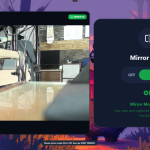
Unclear instructions can make customers hesitate or even leave the booth without completing a transaction. Use a simple display with easy-to-understand buttons. Explain the price, number of prints, session duration, payment methods, and how to get the softcopy. Features such as softcopy QR codes, reprint, Live Frame, filters, and the mirror or non-mirror option should also be briefly explained through the interface.
Do: Update Frames and Filters
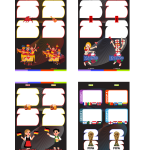
Customers may get bored if the photobooth always uses the same templates. Update frames and filters based on the season, trends, events, or location needs. For weddings, use templates that can be customized with the couple's names. For corporate events, add the logo and brand colors. For tourist locations, use visual elements related to the destination. Design updates can help the booth look more relevant and encourage customers to come back and try again.
Don’t: Use Overly Busy Designs
Frames and filters should enhance the photo, not cover faces or make the image look exaggerated. Avoid too many logos, text, stickers, or clashing colors. Make sure the design leaves enough room for the customer's face and expression. Before use, do a print test to make sure the design looks good both on screen and on paper.
Do: Build Digital Promotion
Instagram and TikTok can be used to show photo results, customer reactions, the setup process, frame concepts, software features, and behind the scenes. Create content that shows customers why they should try your photobooth. Short videos such as “how to use the photobooth”, “photo results before and after filters”, or “unboxing the printed results” can be engaging content. Use the location, hashtags, and a call to share photo results to increase promotional reach.
Don’t: Rely Only on a Busy Location
A photobooth in a strategic location still needs marketing. Do not assume visitors automatically know the booth exists. Use clear signage, attractive lighting, and an opening promotion. You can also run discount programs, vouchers, packages with a café, or promotions at specific hours. If customer numbers drop, evaluate pricing, theme, booth appearance, location, and customer experience. GoPoto advises owners to conduct market research and develop a unique theme when the photobooth starts to quiet down.
Do: Start Gradually
Beginners do not have to open a large booth in a mall right away. You can start with small events, a print station, home, a studio, a café, or a temporary booth. A gradual model lets you test the market, build a portfolio, learn customer behavior, and gather capital for expansion. GoPoto notes that a business can start small and then grow according to customer demand.
Don’t: Rush Into Expansion
Expanding before the operating system is stable can cause problems. Make sure the first booth already has cash flow, work procedures, maintenance, marketing, and a clear monitoring system. After that, you can consider adding units, new locations, or custom photo session services.
Do's and don'ts in the photobooth business basically focus on three things: planning, customer experience, and operational consistency. Do research before buying equipment, choose locations based on the target market, test the entire system, maintain equipment regularly, and make use of technology such as photobooth software and remote maintenance. On the other hand, avoid buying equipment without calculations, choosing locations just because they are busy, ignoring consumables costs, using untested designs, and assuming the business can run without promotion.
With the right strategy, a photobooth becomes not just a photo printing machine, but a service that creates memories, enhances interaction, and opens up sustainable business opportunities.
Ready to start a photobooth business with more thorough preparation? Consult GoPoto Indonesia now on your equipment needs, Glava software, custom frames, printers, and remote maintenance!

































Leave a Reply